
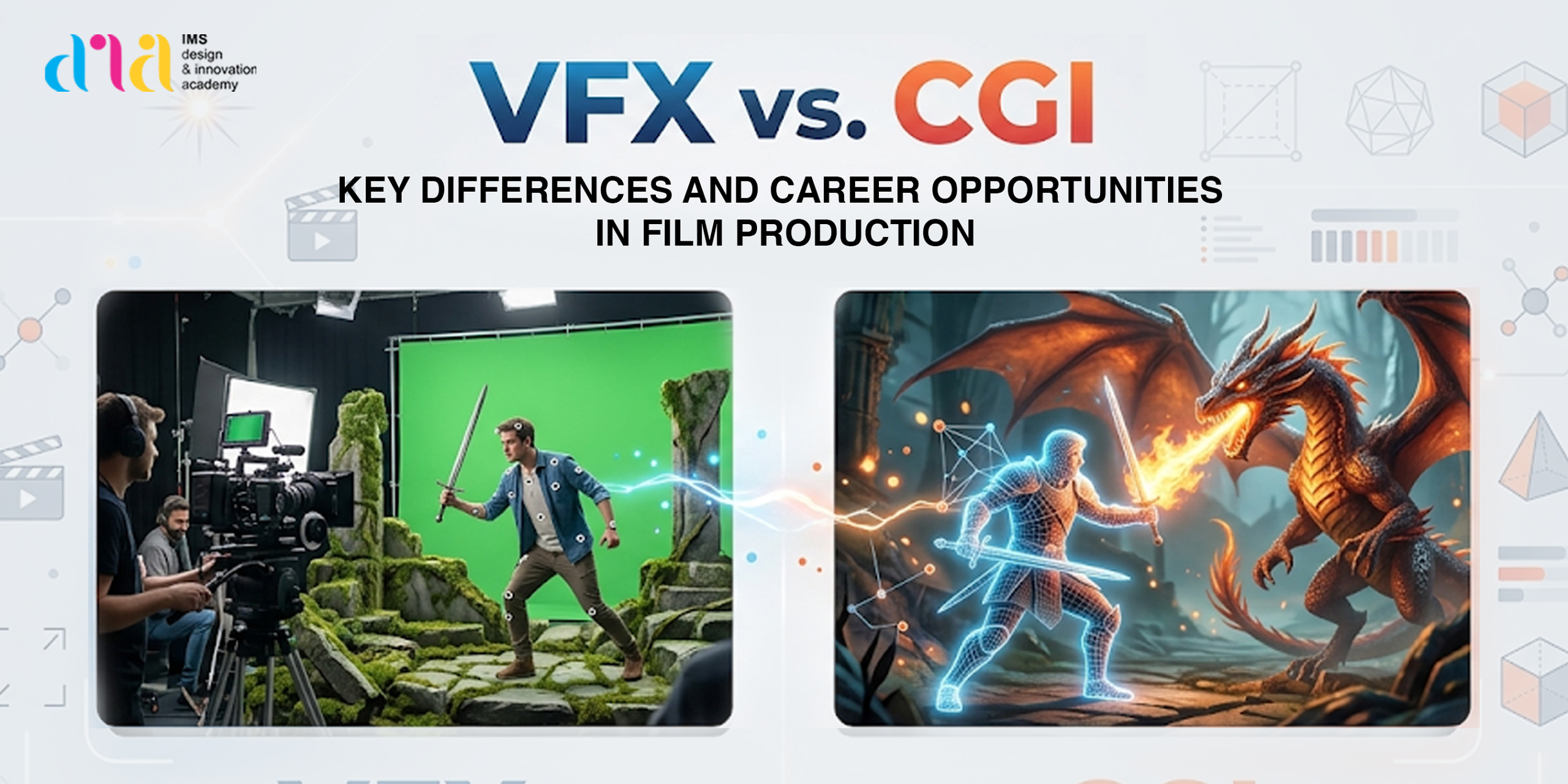
Ever watched a movie and wondered how they made a city fly or turned a regular actor into a 10-foot purple alien? It’s basically digital sorcery. But if you’re looking to get into the industry, you’ve probably hit a wall with the VFX vs CGI debate. While people use them interchangeably, the difference between CGI and VFX is a big deal in the professional world. This blog breaks down VFX and CGI in film production, the tools you’ll need including 10 AI tools for designers, and the exciting VFX career opportunities waiting for you in 2026.
What is the Difference Between VFX and CGI?
In a nutshell, CGI (Computer–Generated Imagery) is about creating something from nothing inside a computer. VFX (Visual Effects) is the “big picture” process of taking that digital stuff and blending it with real–life footage, so it doesn’t look fake. Let’s get deeper into it. CGI is the act of using digital software to create assets like a high–fidelity 3D character, a futuristic vehicle, or a physics–based explosion entirely from a blank digital canvas. On the other hand, VFX is the “integration” phase; it is the overarching discipline of blending those CGI assets (or other digital elements like matte paintings) with real–life, live–action footage.
What is VFX (Visual Effects)?
VFX is the process of creating or altering imagery for film, TV, or digital media that cannot be captured during live-action filming. It combines real footage with computer-generated elements to make scenes look believable. The core idea of VFX is integration, blending different visual elements so seamlessly that the audience can’t tell what’s real and what isn’t.
In simple terms, everything added or changed after the camera stops rolling whether that’s removing a green screen, building entire environments, adding explosions, or enhancing real footage.
What is CGI (Computer-Generated Imagery)?
CGI is the creation of visual content entirely through computers, without using real-world footage. It involves designing 3D models of characters, objects, or environments, adding textures, lighting them realistically, and then rendering them into final images or animations. Everything from a small prop to an entire city can be built digitally using specialised software and powerful computing.
See If You’re Made for Design - Take the IMS DIA Design Aptitude Test
Register NowVFX vs CGI: Visual Difference Explained
Here’s the CGI vs VFX difference explained for the visual learners:
- CGI is “Building”: You start with a blank screen and sculpt a 3D character.
- VFX is “Blending”: You take that 3D character and make sure its shadows, lighting, and movement match the real-life actors in the scene.
Essentially, CGI vs VFX boils down to this: CGI is the asset, and VFX is the integration. If the lighting on a digital creature looks “off,” that’s a VFX problem. If the creature’s muscles don’t move right, that’s a CGI problem. This is exactly the kind of practical understanding you develop when studying at a communication design college in Noida, where both creation and integration are taught as part of real-world film production workflows.
VFX vs CGI: Key Differences
| Feature | VFX (Visual Effects) | CGI (Computer-Generated Imagery) |
|---|---|---|
| Definition | The process of combining, altering, or enhancing real footage with additional elements (digital or practical) to create a believable final shot. Focuses on seamless integration. | The creation of fully digital visuals from scratch using 3D software. Everything is built inside a computer environment. |
| Usage | Enhances or extends real-world scenes by adding environments, effects, or subtle details to improve realism. | Creates entirely new visuals like creatures, fantasy worlds, or futuristic environments that don’t exist in reality. |
| Process | Involves compositing, tracking, rotoscoping, and matchmoving to blend elements with live-action footage. | Follows a pipeline: Modeling → Texturing → Rigging → Animation → Lighting → Rendering. |
| Real Footage | Usually starts with live-action footage and integrates digital elements into it. | Does not require real footage; can be fully digital from start to finish. |
| Tools Used | Software like Nuke, Adobe After Effects, and tracking tools for compositing and enhancement. | Tools like Autodesk Maya, Blender, and ZBrush for 3D creation and rendering. |
| Examples | • Adding rain, fire, explosions to real scenes • Replacing green screen with cityscapes • Extending sets into large environments | • Creating digital creatures (dragons, aliens) • Designing 3D vehicles or objects • Fully animated films |
How VFX and CGI Are Used in Film Production
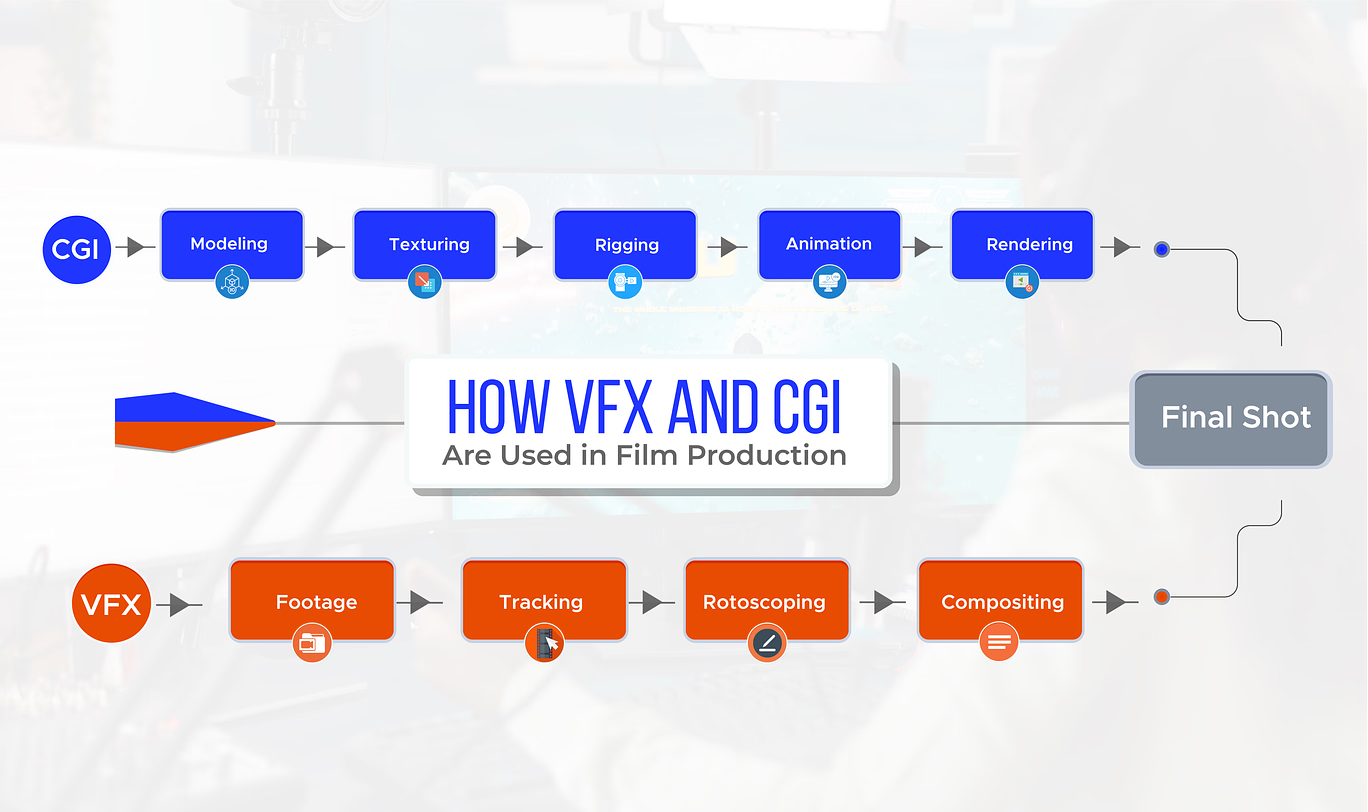
Modern filmmaking depends on the seamless integration of Visual Effects (VFX) and Computer-Generated Imagery (CGI) to create visually immersive scenes. From blockbuster movies to OTT series, this combination allows filmmakers to build realistic worlds that would be impossible to capture on camera alone.
CGI Workflow in Film Production
The CGI workflow begins entirely in a digital environment, where artists create visual elements from scratch. This process typically includes:
- 3D modeling to build characters, objects, and environments
- Rigging and animation to bring movement and life
- Texturing and lighting to add realism
- Rendering to produce final high-quality frames
Using advanced tools like Autodesk Maya and Blender, everything from realistic creatures to complex simulations like fire, water, and explosions is digitally created. These assets form the foundation of modern visual storytelling.
VFX Workflow in Film Production
In contrast, the VFX pipeline starts with real-world footage, also known as the “plate.” VFX artists enhance this footage using techniques such as:
- Matchmoving to track camera motion
- Rotoscoping to isolate subjects frame by frame
- Compositing to combine multiple visual layers
Software like Nuke and Adobe After Effects is commonly used to blend CGI elements into live-action scenes. The goal is to ensure that lighting, shadows, textures, and motion perfectly match the original footage, making digital additions look completely natural.
How CGI and VFX Work Together
The real magic happens when CGI and VFX pipelines merge. CGI creates the digital assets, while VFX integrates them into real footage. During compositing, artists carefully align:
- Lighting and reflections
- Camera angles and perspective
- Film grain and motion blur
This ensures that CGI elements appear as if they were physically present during filming.
Confused, What to Choose between VFX & CGI? Talk to a counselor
Get a Call BackExamples of VFX and CGI in Movies
Understanding the difference between these two disciplines is easiest when looking at how they are applied in global cinema. Some films rely entirely on digital creation, while others use technology to enhance what was captured on a physical set.
CGI-Heavy Films: Building from Scratch
In 100% digital environments like Disney’s 2019 The Lion King, every frame is a product of CGI. There were no real lions on a physical set; instead, every blade of grass and the realistic texture of Simba’s fur was modeled, lit, and rendered inside a computer. Similarly, in Avatar: The Way of Water, the Na’vi characters and the bioluminescent reefs of Pandora are pure CGI assets. While the actors’ movements were captured, their entire physical appearance and the world they inhabited were built from a blank digital canvas.
VFX-Heavy Films: Enhancing Reality
VFX shines when digital elements must coexist with real actors. In Bollywood’s Brahmāstra, the production used extensive VFX to integrate the “Astras”–glowing, energy–based weapons–into live–action fight sequences. When Ranbir Kapoor’s character manifests fire, VFX artists tracked his physical movements to ensure the digital flames behaved realistically against his body. Another classic example is Jurassic Park (1993), which famously blended physical animatronic dinosaurs with CGI versions. In the iconic T–Rex breakout scene, the dinosaur was a digital model (CGI) during the wide shots but was seamlessly integrated with real rain, mud, and practical car props using VFX compositing.
The Hybrid Approach
Most modern blockbusters, like Bahubali, use a hybrid of both. The massive waterfalls and the Kingdom of Mahishmati were built using CGI, but they were merged with live–action footage of the actors through VFX. This allowed the characters to look as though they were truly standing on the edge of a massive, digitally created precipice, proving that the best films use CGI to create the “what” and VFX to handle the “how.”
Types of VFX and CGI Used in Film Production
Types of VFX
- Compositing: The “Photoshop for video” where you stack layers together.
- Motion Tracking: Ensuring digital objects stay “pinned” to the moving camera.
- Matte Painting: Digital landscapes that replace boring backgrounds.
Types of CGI
- 3D Modeling: Creating the digital “sculpture” of an object.
- Rigging: Giving a 3D model with a skeleton so it can move.
- Simulation: Using physics to create realistic water, fire, or hair.
Skills Required for VFX and CGI Careers
To succeed, you need a “T–shaped” skill set: deep expertise in one area and a broad understanding of the whole pipeline. For what is VFX in movies, you need a sharp eye for lighting, color theory, and composition. For a CGI animation career, you must master 3D space, anatomy, and sometimes even coding (Python) for technical direction. Both paths require immense patience and a “problem–solving” mindset to fix glitches that occur during rendering.
Core Skills You Actually Need
- Lighting & Color Theory: You need to understand how light behaves in the real world: intensity, shadows, reflections, and color temperature. In VFX, this helps match CGI elements with live footage. In CGI, it’s what makes a scene feel realistic instead of flat or artificial.
- Composition & Visual Framing: Knowing where to place elements in a frame is critical. Good composition guides the viewer’s eye and maintains visual balance. Without it, even technically perfect work can feel off.
- Understanding of 3D Space: Especially important for CGI, this means thinking in depth, scale, and perspective. You’re not just working on a flat screen; you’re building a virtual world where distance, proportion, and camera angles matter.
- Modeling & Texturing: For CGI roles, you need to create detailed 3D objects and give them surface qualities (like metal, skin, and fabric). This is what turns a basic shape into something believable.
- Animation Fundamentals: Movement needs to feel natural. Whether it’s a character or an object, understanding timing, weight, and motion is what separates stiff animation from something that feels alive.
- Compositing & Integration: This is the core VFX skill, where everything comes together. You combine multiple layers (footage, CGI, effects) into one seamless image. If this fails, the illusion breaks instantly.
- Tracking & Matchmoving: You need to match the movement of the real camera inside a digital environment. This ensures that CGI elements stay locked into the scene instead of “floating” unnaturally.
- Basic Coding (Python): Not mandatory for every role, but extremely valuable. Scripting helps automate repetitive tasks, manage complex scenes, and is especially useful in technical direction roles.
Career Opportunities in VFX and CGI in 2026
The VFX and CGI industry isn’t small anymore it’s a full-scale ecosystem. With streaming platforms, high-end advertising, gaming, and especially virtual production becoming more common, the demand for skilled artists and technical specialists has grown fast. But here’s the reality: it’s not just about getting “a job in VFX.” You need to understand where you fit in the pipeline, because each role solves a very specific problem.
Below are some of the most important career paths:
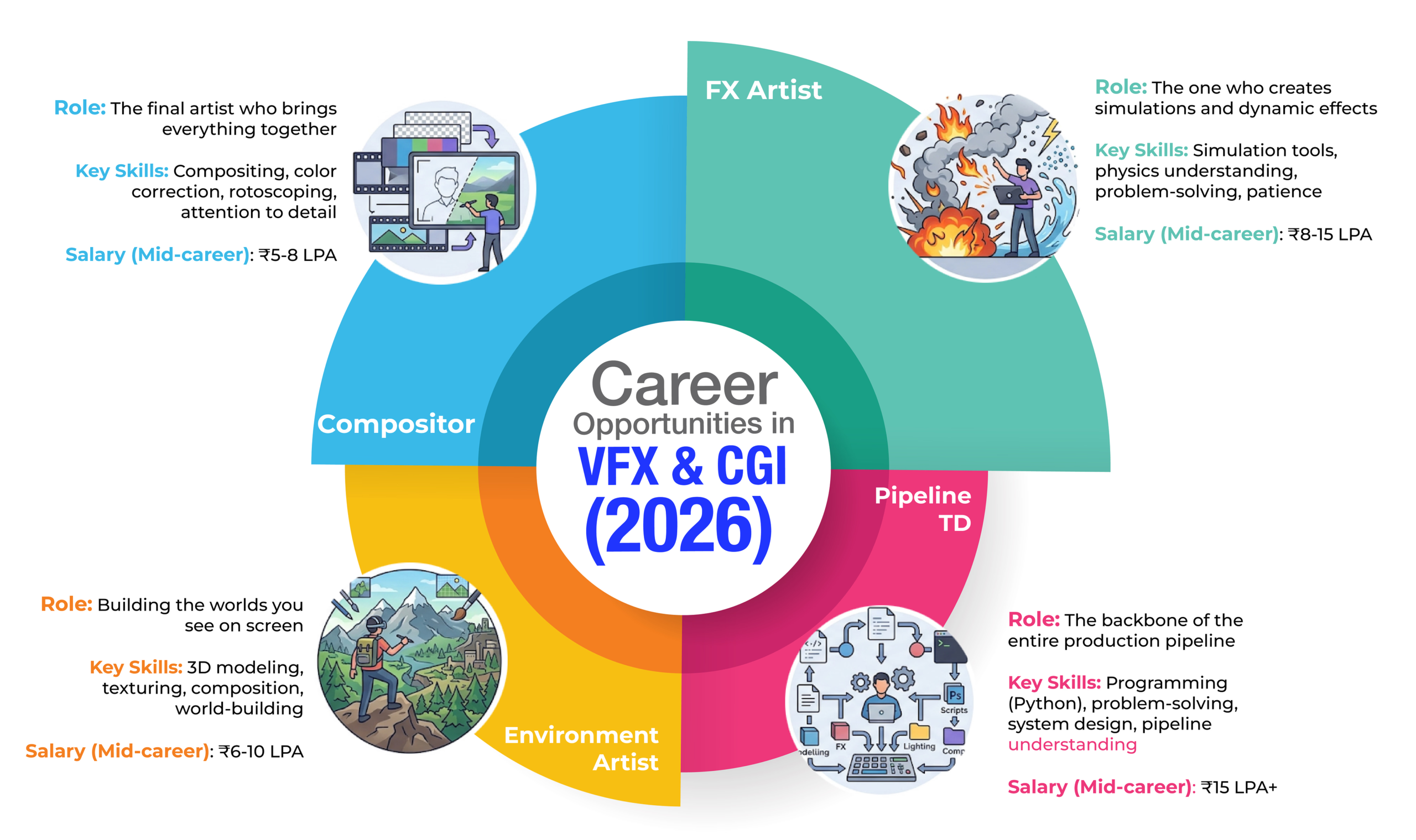
Compositor
Role: The final artist who brings everything together
A compositor sits at the very end of the pipeline and is responsible for making the shot look complete and believable. They take all the elements of live-action footage, CGI renders, matte paintings, effects and blend them into a single seamless image.
This isn’t just layering images. It involves matching lighting, adjusting colors, fixing edges, adding depth (like motion blur and depth of field), and ensuring nothing feels “stuck on.” If something looks fake, it’s often the compositor’s job to fix it even if they didn’t create the problem.
- Key Skills: Compositing, color correction, rotoscoping, attention to detail
- Salary (Mid-career): ₹5-8 LPA
If you like refining and perfecting visuals, this role suits you. But it demands a sharp eye small mistakes are obvious here.
FX Artist
Role: The one who creates simulations and dynamic effects
FX artists handle anything that moves in a complex, natural way of fire, smoke, water, explosions, destruction, dust, magic effects. These aren’t manually animated; they’re simulated using physics-based systems.
The job is part artistic, part technical. You need to understand how real-world forces behave, then recreate them digitally in a controllable way. It often involves heavy iteration because simulations can be unpredictable and time-consuming to render.
- Key Skills: Simulation tools, physics understanding, problem-solving, patience
- Salary (Mid-career): ₹8-15 LPA
This role is demanding but highly valued. Good FX work is hard to fake and even harder to master.
Environment Artist
Role: Building the worlds you see on screen
Environment artists create large-scale digital settings cities, landscapes, interiors, or entire fictional worlds. Sometimes they extend real sets; other times, they build everything from scratch.
The challenge here is scale and realism. You need to think about architecture, lighting, weather, textures, and how everything fits together visually. A weak environment breaks immersion instantly.
- Key Skills: 3D modeling, texturing, composition, world-building
- Salary (Mid-career): ₹6-10 LPA
If you enjoy designing spaces and thinking big picture, this role gives you that freedom, but it also demands consistency and realism.
Pipeline TD (Technical Director)
Role: The backbone of the entire production pipeline
This is where things get serious. A Pipeline TD doesn’t directly create visuals; they build systems that allow everyone else to work efficiently.
They write scripts (often in Python), automate repetitive tasks, manage file workflows, and ensure that different software tools communicate properly. In large studios, without Pipeline TDs, production would slow down or collapse under its own complexity.
They’re also the ones fixing technical bottlenecks, optimizing performance, and sometimes building custom tools tailored to a studio’s needs.
- Key Skills: Programming (Python), problem-solving, system design, pipeline understanding
- Salary (Mid-career): ₹15 LPA+
This role pays more for a reason. It requires both creative pipeline knowledge and strong technical ability. Not glamorous but absolutely critical.
Other Roles Worth Knowing
The industry is broader than just these four roles:
- 3D Modeler: Creates detailed objects and assets
- Animator: Brings characters and objects to life
- Lighting Artist: Controls how scenes are lit and rendered
- Matches move Artist: Tracks camera movement for accurate CGI placement
- Roto Artist: Isolates elements from footage frame by frame
Scholarships for Future Designers – Support for talented and creative minds
Learn MoreVFX vs CGI: Which Career Path Should You Choose?
People tend to treat VFX and CGI like the same thing, but they don’t feel the same when you work in them. VFX usually starts with existing footage. A scene has been shot, and now it needs adjustments, sometimes subtle, sometimes heavy, but the end result still has to feel real. If the added elements stand out, the work fails. That’s why a lot of VFX comes down to understanding how things behave more than anything else.
There’s also less freedom than people expect. You’re not deciding everything you’re matching what’s already there. Lighting, camera angle, and even tiny details have to line up. Tools like Nuke or Houdini help, but they don’t fix bad judgments.
CGI is a different kind of process. Nothing existed at the start. If there’s a character or an environment, it has to be built first, then shaped, textured, and animated. It takes longer, and there’s more control, but also more responsibility, because everything is on you. Software like Autodesk Maya or Blender is standard, but again, the tool isn’t the deciding factor.
The gap between the two is basically this: VFX works around reality; CGI replaces it. One depends on what’s already there; the other doesn’t. So, the choice isn’t about which is better, it’s about which way of working you won’t get tired of. This is also a key discussion point at events like the 2026 AI Summit in Delhi, where the future of creative workflows and AI-driven design continues to evolve.
Courses to Learn VFX and CGI After 12th
1. Full Degree Courses (3-4 years)
These are structured, slower, and give you both theory + practical + exposure.
B. Sc in Animation & VFX / Multimedia & VFX
Duration: 3 years
What you study:
- 3D modeling, texturing, lighting
- Animation principles (timing, motion, physics)
- VFX compositing, green screen work
- Editing + cinematography basics
Who it’s for: If you want a proper foundation + backup degree
Reality check:
- Good for learning basics deeply
- But industry doesn’t care about the degree much your showreel matters
BVA (Bachelor of Visual Arts – Animation / VFX)
Duration: 4 years
Focus: More artistic + design-heavy
You’ll learn:
- Drawing fundamentals
- Storyboarding
- Visual storytelling
Best for: People who lean toward art + films, not just software
2. Industry Diplomas
This is where most VFX artists actually start.
Diploma in Animation & VFX
Duration: 12-24 months
What you learn:
- 3D animation (Maya/Blender)
- Compositing (After Effects, Nuke)
- Motion graphics
- Basic filmmaking
Outcome: Job-ready faster than a degree.
Diploma in VFX (Specialized)
Duration: 1-3 years
Core skills:
- Rotoscoping
- Matchmoving
- Compositing
- CGI integration
Best for: If you already know you want film VFX specifically.
Advanced Diploma in 3D Animation / CGI
Focus:
- Character animation
- Rigging
- Simulation (fire, water, destruction)
Tools: Maya, Houdini, Unreal
Best for: People aiming for high-end CGI roles
3. Institute-Specific Programs
These are what you’ll actually enroll in:
MAAC (Maya Academy of Advanced Cinematics) Programs
AD3D EDGE Plus (Advanced 3D Animation Program)
- Covers modeling → rigging → rendering
VFX Plus / Advanced VFX Course
- Focus on compositing, tracking, film VFX
Compositing Pro / Advanced Compositing
- Deep dive into post-production
Arena Animation Programs
- VFX Prime / Animation & VFX Program
- Advanced Program in Animation & VFX
- Game Art & Design + VFX hybrid courses
4. Online High-End Courses
Rebelway
- Focus: Houdini FX (explosions, simulations)
- Used by film-level artists
- Expensive but elite
CG Spectrum
- Mentorship-based learning
- Specializations: FX Artist, Animator, Compositor
- Industry feedback on your work
Software-Specific Certificate Courses
- Duration: 3-12 months
- Example: Maya Certification
- Best for: skill upgrade, not full career start
Future Scope of VFX and CGI in Film and Media
The future of VFX and CGI is not just “growing” it is expanding across industries while becoming faster, cheaper, and more integrated into production itself. This shift is being driven by OTT demand, real-time engines, and AI-led workflows. At the same time, there is increasing support through schemes and policies for design students, which are making it easier to access quality education, industry tools, and funding opportunities to build a career in this space.
1. Market Size and Growth (Global + India)
The numbers make one thing clear: this industry is scaling, not slowing down.
- The global VFX market is projected to grow from $6.17 billion in 2026 to $13.31 billion by 2035, with a CAGR of ~8.9%
- Another estimate places steady global growth at ~6.4% CAGR through 2033
- Over 71% of original streaming content already uses significant VFX
India specifically:
- Industry expected to reach $2.2 billion by 2026
- Market was already ₹79 billion in 2020 → projected ₹147 billion by 2024
- Around ₹54 billion in 2023, growing ~10% YoY
- Expected to create 160,000+ new jobs annually
Translation: This isn’t a niche field anymore it’s becoming a core pillar of the media economy.
2. Streaming Platforms Are Driving Demand
Platforms like Netflix and Amazon Prime Video are the biggest reason demand is exploding.
- Streaming platforms compete on visual quality, not just storytelling
- High-end CGI is now standard even for series not just films
- A single OTT show can require hundreds of VFX shots per episode
A real-world indicator:
- Netflix opened a global VFX hub in Hyderabad, expected to employ ~300 artists by 2026
Impact:
- More consistent work (not just film-based projects)
- Rise of long-form VFX pipelines (series, not just movies)
3. Rise of Real-Time and Virtual Production
Traditional VFX is post-production heavy. That’s changing fast.
With tools like Unreal Engine:
- Rendering time is reduced from days → minutes
- Around 33% of projects already use real-time workflows
- LED wall virtual production reduces location shooting costs
What this changes:
- Directors see final visuals during shooting
- Faster turnaround = more projects
- New roles: Real-Time Artist, Virtual Production Supervisor
VFX & CGI Are Just the Beginning - Dive Into Communication Design & Visual Storytelling
Explore Courses & ScopeConclusion
The VFX vs CGI debate isn’t about choosing one over the other; it’s about understanding how they work together. Tools like Autodesk Maya or Blender create the visuals, while Nuke and Adobe After Effects make them feel real within a scene. One builds, the other integrates.
With real-time engines like Unreal Engine and AI speeding things up, the industry is moving faster and expanding beyond films into streaming, gaming, and more. But the core reality hasn’t changed your portfolio matters more than anything else.
So instead of asking “VFX or CGI?”, focus on where you fit in the pipeline and get really good at it. That’s what actually gets you hired, especially if you’re learning at a design institute in Noida where industry-relevant tools and workflows are part of the training.
FAQs
1. What is the difference between VFX and CGI in film production?
The difference between VFX and CGI is simple but important. CGI (Computer-Generated Imagery) is used to create 3D models, characters, and environments from scratch using tools like Autodesk Maya and Blender. VFX (Visual Effects) is the process of integrating these CGI elements into real footage using software like Nuke and Adobe After Effects to make scenes look realistic.
2. Which is better for a career: VFX or CGI in 2026?
Choosing between VFX and CGI careers depends on your interest. VFX roles like compositing and matchmoving suit those who enjoy working with real footage and visual accuracy. CGI roles like modeling and animation are better for those who prefer creating digital worlds. With real-time tools like Unreal Engine, hybrid skills are becoming more valuable in 2026.
3. How do VFX and CGI work together in movies?
In film production, CGI is used to build characters, environments, and effects, while VFX integrates them into live-action footage. This includes matching lighting, shadows, and camera movement so the final shot looks natural and believable.
4. What software is commonly used for VFX and CGI?
CGI software includes Autodesk Maya and Blender for modeling and animation. VFX software includes Nuke and Adobe After Effects for compositing, tracking, and post-production work.
5. What skills are required for VFX and CGI careers?
A career in VFX and CGI requires both technical and creative skills. Key skills include 3D modeling, animation, compositing, lighting, and understanding of camera movement. Knowledge of tools like Blender and Adobe After Effects is essential, along with a strong portfolio or showreel.

